Docker Cheat-Sheet [Day20 ]
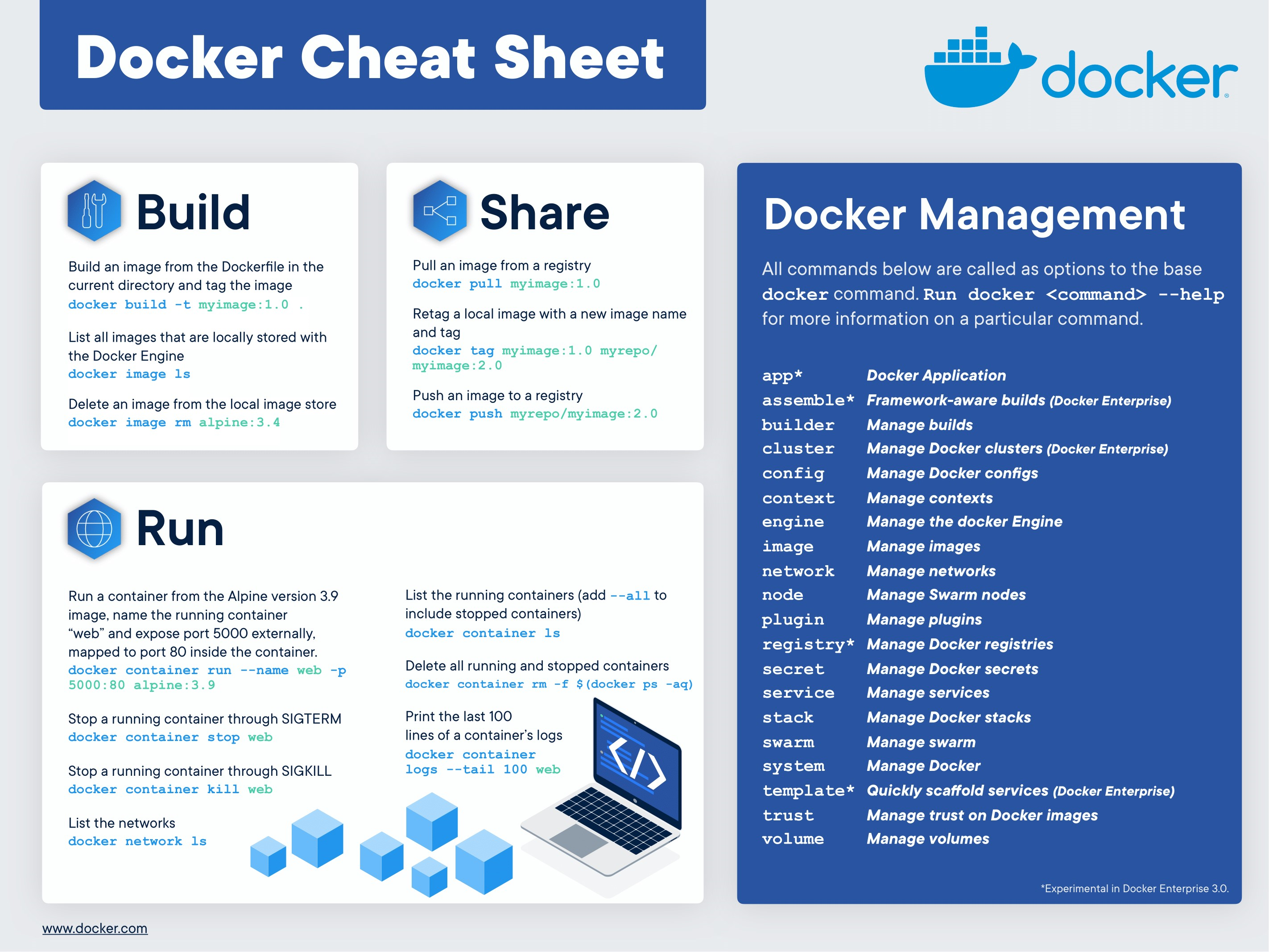
![Docker Cheat-Sheet [Day20 ]](https://cdn.hashnode.com/res/hashnode/image/upload/v1692069429865/a1c5c859-a9e1-41f9-9e25-6851ab44939e.jpeg)
This is a full cheat-sheet of some Docker useful commands.
Container Management Commands
See the containers currently running on the system:
See the containers currently running on the system:

See all the containers, both running and non-running:

Create a container (without starting it):

Create an interactive container with pseudo-TTY:

Rename an existing container:

Delete a container (if it is not running):

Forcefully remove a container, even if it is running:

View logs for a running container:

Update the configuration of one or more containers:

View port mapping for a container:

Show running processes in a container:

View live resource usage statistics for a container:

Show changes to files or directories on the filesystem:

Copy a local file to a directory in a container:

Running a Container
Run a command in a container based on an image:

Create, start, and provide a custom name for the container:

Establish a connection with a container by mapping a host port to a container port:

Run a container and remove it after it stops:

Run a detached (background) container:

Start an interactive process, such as a shell, in a container:

Start a container:

Stop a running container:

Stop a running container and start it up again:

Pause processes in a running container:

Resume processes in a running container:

Kill a container by sending a SIGKILL to a running container:

Attach local standard input, output, and error streams to a running container:

Run a shell inside a running container:

Image Management Commands
- Create an image from a Dockerfile:

Build an image from a Dockerfile located in the current directory:

Create an image from a Dockerfile and tag it:

Specify a file to build from:

Pull an image from a registry:

Push an image to a registry:

Create an image from a tarball:

Create an image from a container:

Tag an image:

Show all locally stored top-level images:

Show history for an image:

Remove an image:

Load an image from a tar archive or stdin:

Save an image to a tar archive file:

Remove unused images:

Docker Networking Commands
List available networks:

Remove one or more networks:

Show information on one or more networks:

Connect a container to a network:

Disconnect a container from a network:

Some General Commands Of Docker
Log in to a Docker registry:

Log out of a Docker registry:

List low-level information on Docker objects:

Display the version of the local Docker installation:

Display information about the system:

Remove unused images, containers, and networks:

Thank you for reading :)

![Working with Services in Kubernetes [Day-33 Task]](https://cdn.hashnode.com/res/hashnode/image/upload/v1700028034520/afa3a226-071a-4070-9bca-1c4ab88507d6.png)
![Working with Namespaces and Services in Kubernetes[Day 32 Task]](https://cdn.hashnode.com/res/hashnode/image/upload/v1699679440836/a9841239-6d67-4174-9560-28ce52a72781.png)